Top 10 Tips for Working from Home for Apartment Living

Working from home comes with some obvious benefits: there’s no commute, all the comforts of home (including favourite snacks) are within easy reach, and your loved ones and/or pets are always nearby. However, working from home can lose its appeal when those same benefits start working against you and make productivity challenging. We’ve compiled a list of our top 10 work-from-home tips for apartment dwellers to help you stay productive no matter where you’ve set up your workspace in your home. From ergonomic workspace design to attaining peace and quiet, we’ve got you covered.
-
1. Define your workspace
Create a designated area in your suite for work and only work. This will help your brain associate that particular space with work, and the other spaces of your suite with rest. When choosing where to set up your workspace, reflect on what type of work environment makes you most happy and productive. Do you want to be near a window with lots of natural light, or do you prefer a soothing, low-lit space? Do you need to be behind a closed door to stay distraction-free? If a closed door isn’t possible, dividers, folding screens, bookshelves, and curtains can help section off your workspace from your living area while helping minimize distractions.
To truly separate work from rest, avoid working in places you normally relax, like your bed or couch. The lines between work and rest can get easily blurred, and your brain can quickly begin to associate those spaces with work, making it harder to fully unwind after the workday.

-
2. Minimize mess, maximize productivity
To stay productive in a small apartment, keep it clean! By keeping your space tidy and uncluttered, your mind can more easily focus on your work instead of the mess around you. Even minor visual clutter can quietly pull your attention in different directions and make it harder to concentrate. Working in a clean room sets a positive tone for the day and helps boost productivity and work satisfaction!
-
3. Make the most of a small desk
If you’re short on space, don’t worry even a tiny work desk can be effective. Keep only the absolute essentials on your desk (laptop/desktop, mouse, headset, etc.) and store the rest in a drawer to minimize distractions. You can also place shelves, organizers, or containers nearby to save space and keep everything neat. Good lighting is key and doesn’t have to take up precious desk space. Consider a floor lamp or workbench-style lamp that clamps onto the edge of your desk.
-
4. Block out distractions
If you’re a renter, unwanted noise can be a huge distraction, especially if you work regular daytime hours. To help block noise from traffic, construction, and pets, invest in a good pair of over-the-ear noise-cancelling headphones. We highly recommend doing your research and checking reviews to find headphones that you can wear comfortably all day, since some brands tend to fit tighter than others. If your job requires long periods of deep concentration, try listening to classical or lyric-free music while you work. If all music is distracting, try white or brown noise.
What’s the most notorious distraction during the workday (and all throughout the day)? Your phone. To minimize mindless scrolling, keep it on silent, and if possible, leave it in another room.
-
5. Follow the 90-degree rule
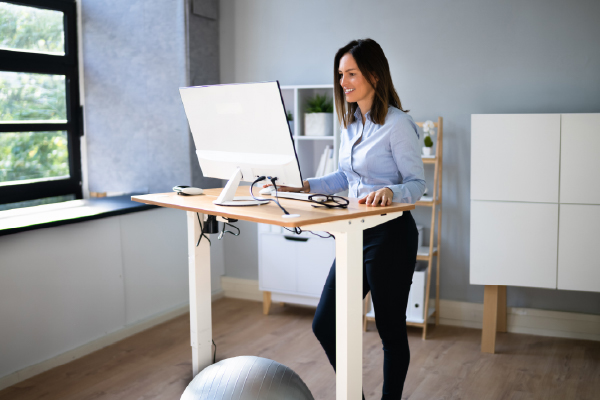
For a simple ergonomic work-from-home setup for an apartment, focus on the 90-degree rule (elbows, hips, and knees at 90°) to prevent strain in small spaces. Key solutions include using a compact standing desk, adding a laptop stand to elevate screens to eye level, and investing in an adjustable chair to help with lumbar support. Positioning your monitor about an arm’s length away can also help reduce eye strain and encourage better posture. Even if you don’t have a sprawling desk set-up, focusing on ergonomics can improve posture, productivity, and overall comfort while working.
-
6. Stay active while you work
In the previous tip, we mentioned standing desks, which come with the huge health benefit of reducing the time you spend sitting while you work. If you feel restless while working from home, a standing desk could be the solution for you: it allows you to stretch your legs and expend some extra energy throughout the day. Still feel fidgety? A walking pad is a great investment for those who frequently work from home. By placing the walking pad under your desk, you can hit your daily step count goal while completing your work: peak efficiency. Plus: Moving your body significantly improves brain function. Physical activity boosts cognitive performance, strengthens memory, improves focus, and increases brain volume. All the more reason to consider an alternative desk setup that reduces or eliminates sitting.
-
7. Set your desk up for success
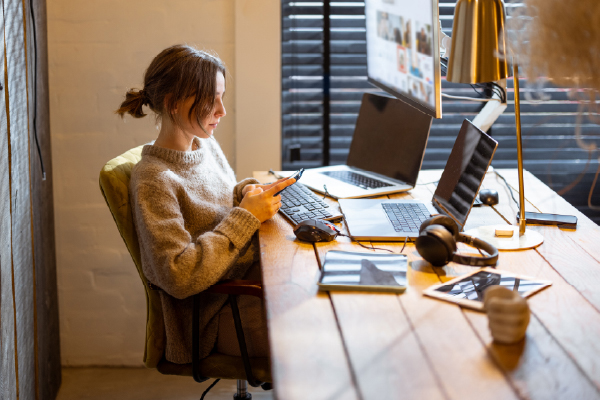
The way you position your desk can make a big difference in how comfortable and focused you feel throughout the day. If possible, place your desk where you can see the entrance to the room without sitting directly in the path of the doorway. It can also help to position your chair against a solid wall for a greater sense of stability and support. Try to avoid setting up with your back directly to a window or in a high-traffic area, where movement can become distracting. If your floor plan limits your options, simple adjustments like adding a small mirror, a bookshelf, or a room divider can help create a setup that feels more grounded and functional.
-
8. Prioritize routine
Start your day the same way you would if you were heading into the office: take a shower, have your morning coffee, and get dressed in work-appropriate clothes that make you feel professional when you wear them. Keeping a familiar routine can help you stay focused and avoid the temptation to slip into “home mode” during work hours. Wherever possible, try to connect with your work colleagues in meetings with cameras on. Face-to-face interaction keeps you engaged and helps create more authentic connections.
-
9. Step away to stay productive
When you work from home and there aren’t any colleagues around to signal that it’s time for a coffee break, it can be harder to step away from the screen. Pre-schedule your breaks throughout the day by setting a timer. Even just a small break to step out of “work mode” momentarily can significantly help prevent burn-out. During your lunch break, go for a walk to get some fresh air and change of scenery.
-
10. Create an end-of-workday ritual
When your workday is finished, take time to fully disconnect. Shut off your screen and put away work materials. Turn your work devices to “do not disturb” to create a clear boundary between work and home life. You may even choose to take a shower and change into different clothes. Whatever your end-of-workday ritual looks like, it should help separate your work and living space in an apartment, allowing your mind and body to decompress.